





Course Relevance: This caselet will be useful for PGDM – Python for Datascience and MCA, BCA course.
Academic Concepts: In this caselet, students will be introduced to the concept of No‑Code platforms and gain a basic understanding of how Antigravity can be utilized as a No‑Code solution.
Teaching Note:
The caselet introduces No code platform and it’s step by step implementation with Google Antigravity. It explains the rise of no‑code platforms, enabling non‑programmers to design functional applications through intuitive interfaces. Usage of Google Antigravity for building application, how It reduces barriers to innovation by emphasizing speed, accessibility, and user‑friendly workflows. How such platforms reshape digital literacy, making creation possible for educators, entrepreneurs, and students.
Learning Objectives:
By the end of this caselet, students should be able to:
- Understand the concept of no‑code platforms and their role in democratizing application development.
- Analyze how Google Antigravity simplifies workflows through drag‑and‑drop and visual design tools.
- Evaluate the benefits and limitations of building without coding in educational and professional contexts.
- Apply no‑code principles to prototype simple solutions for real‑world problems.
Building Without Coding: Using Google Antigravity as a No-Code Platform
The software development world has just changed. It has traditionally taken months to learn the syntax to build an app, or you have to struggle with rigid drag and drop “no-code” builders that fail if you want something they don’t have in their pre-built templates. A no code platform is a software development environment where anyone can create apps, websites, database, or automation workflows without coding a single line. Users respond to a visual interface, rather than typing thousands of lines of syntax (such as JavaScript, Python or C++). It basically brings the software-making process to everyone, and lets business analysts, marketers, entrepreneurs or students create software that earlier would require a software engineering team.
How Do No-Code Platforms Work?
The no code tools take human actions and make it into working code. They tend to use three basic visual elements:
Drag-and-Drop Builders: You use drag-and-drop to arrange components such as buttons, text boxes, images, form fields, and more in the exact way you want them to appear. Rather than entering sophisticated coding logic (if/then),
Visual Logic/Workflows: you visualize the logic with a visual flowchart (e.g., “If the user clicks this button, then send them a welcome email”) and create a visual logic/Workflows.
Pre-built Integrations: You can integrate your app with tools other than your own by cutting out the manual coding of APIs and just using pre-built Integrations and authorizing access to them in a simple menu.
What is Google Antigravity?
While technically listed by Google as an agent-first development platform, Google Antigravity can be a potent secret weapon for developers — if they use it correctly, it can be one of the most flexible forms of software development without them needing to write any code themselves. You don’t need to drag visual blocks, just talk or type in natural language. Antigravity’s autonomous AI agents take care of the file structure, writing the code, running an internal browser to test it and fixing their own bugs. Antigravity is currently in public preview (November 2025), and is available for free for individuals, supporting models such as Gemini 3 Pro, Anthropic’s Claude models and OpenAI’s GPT-OSS. In this guide, we’ll walk through how to build a fully functional web app from scratch using Antigravity – without writing a single line of code.
The Antigravity Concept: Drag and Drop to “Prompt and Build” In traditional no-code environments, you can only see what’s possible in their design widgets. On the other hand, Antigravity is a different approach: It listens to the agent panel and creates the application in real time. To build trust, it doesn’t just raw code -it creates Artifacts: task lists of the structured tasks, architectural plans, and interactive previews, so you can see what it’s doing and give feedback on the spot.
Step-by-Step Guide: Building Your First App:
Create a simple calculator application that performs basic arithmetic operations (addition, subtraction, multiplication, division).
Step 1: Search from google Download and open the Antigravity standalone application.
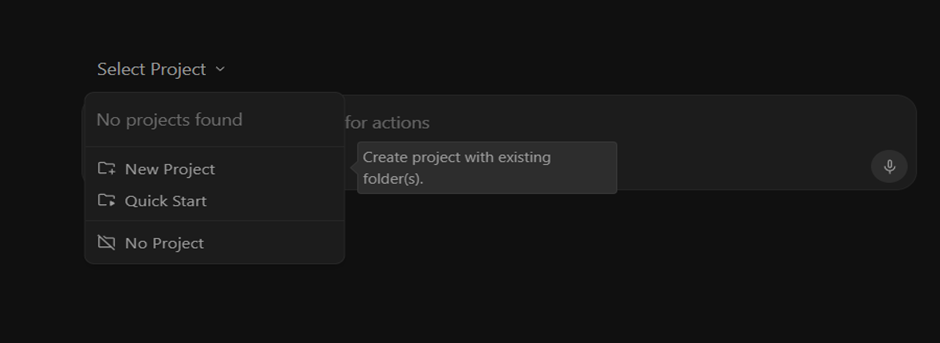
- Select Projects from the sidebar and click New Project.
- Name your project (e.g: Simplecalculatordemo) and choose a local directory folder where the files will live.
Step 2: The Initial Prompt (Building the Core)
Navigate to the Agent Chat panel on the side. This is where your building happens. Paste the following text into the prompt window and hit enter:
Plaintext
Create a simple calculator application that performs basic arithmetic operations (addition, subtraction, multiplication, division). The app should have a clean and interactive user interface with buttons for digits (0–9), operators (+, -, ×, ÷), and an equals button. Include a clear display area to show input and results. Ensure the UI is responsive, user-friendly, and visually appealing with modern design elements (e.g., rounded buttons, hover effects, and distinct colors for operators vs. numbers). Implement error handling for invalid inputs (like division by zero). Provide the code in a structured format with comments for readability.
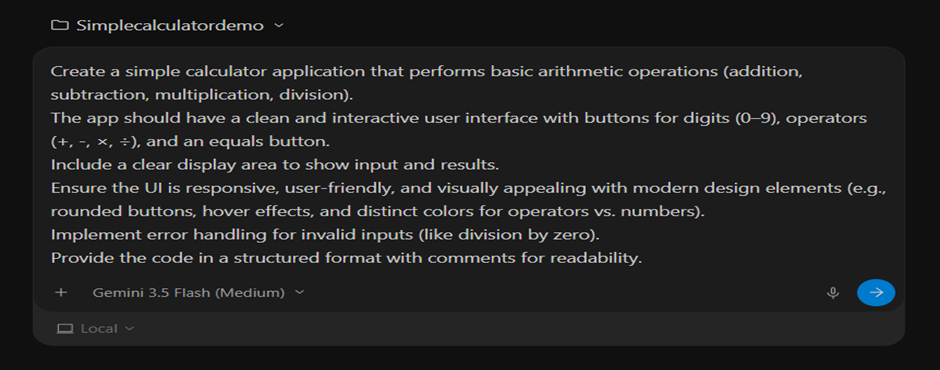
Once you submit, watch the Magic happen. In the Manager view, you will see the agent instantly generate a Task List and an Implementation Plan. It will autonomously create index.html, style.css, and script.js files in your project directory.
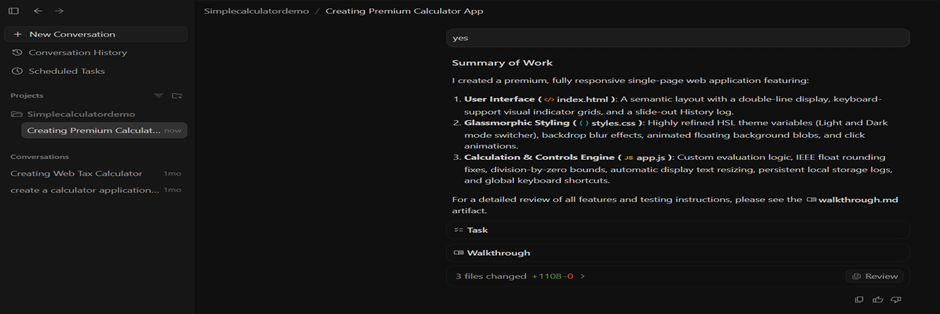
The Antigravity Agent UI will actively generate the file structure and checking off tasks on its Task List.
Step 3: Previewing the Application
Antigravity includes an integrated live browser preview. Once the agent outputs its first draft:
Step 4: Final output:
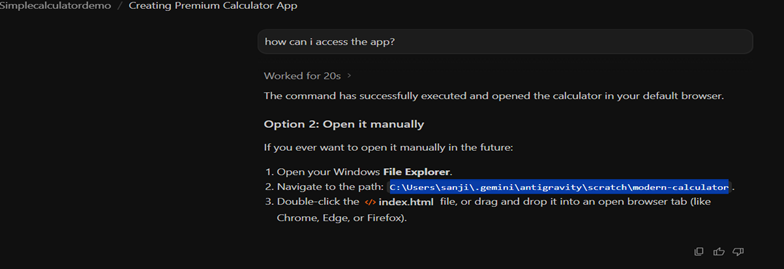
Step 5: Shipping Your App
Once you are happy with the preview, your app files sit ready in your local directory folder.
- Open your project folder to find your clean index.html, style.css, and script.js.
The Application:
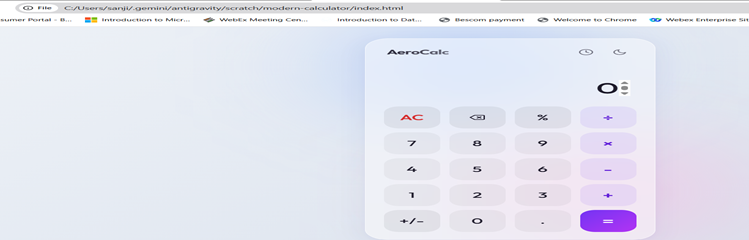
Why Antigravity Changes the No-Code Game:
No Ceiling
Traditional no-code tools are built on pre-defined blocks — a form field, a payment button, a Slack trigger. The moment your idea needs something outside that library, you either hit a hard wall or have to bolt on custom code the platform was never designed to support. Antigravity doesn’t work off a fixed menu of components. Because the agent is writing real, general-purpose code rather than configuring a template, the only real constraint is how clearly you can describe what you want. Want the timer to change color as time runs low, sync across browser tabs, or send a desktop notification when a session ends? You don’t wait for the platform vendor to add that feature — you just ask for it, and the agent writes the logic from scratch.
Complete Code Ownership
Most no-code platforms are walled gardens: your app lives inside their infrastructure, runs on their servers, and often can’t be exported as standalone code. If the company changes its pricing, shuts down, or restricts a feature, your app is stuck with it. Antigravity works differently. Because it’s built on a real code editor, everything the agent produces — HTML, CSS, JavaScript, or whatever stack fits the project — lands as plain files on your machine. You can open them, move them, host them anywhere, or hand them to a developer later. There’s no vendor lock-in and no black-box runtime; you end up with the same kind of clean, portable codebase a human engineer would hand you.
Self-Correcting
In a typical no-code tool, when something breaks, you’re the one who has to dig through settings menus or support forums to figure out why. Antigravity’s agents close that loop themselves. Because they can launch the app in an internal browser, click through it, and observe the result, they don’t just take your word for what’s broken — they can reproduce the problem. Tell the agent “the pause button stopped working,” and it will open the app, test the button, inspect the relevant code, identify the bug, fix it, and verify the fix by testing again — all without you needing to know what a stack trace is.
Conclusion
Google Antigravity bridges the final gap between having an idea and shipping a product. By treating AI as an autonomous operational partner rather than a simple autocomplete box, it hands non-developers a level of creative and technical control that used to require hiring an engineering team.
One key question to consider is -whether the prompt fully captures all requirements and whether the implementation path is properly aligned?
You describe the outcome; the agent handles the architecture, the implementation, and the debugging — and shows its work along the way so you always know what’s happening under the hood. The result is a workflow where anyone with a clear idea can step into the role of a software architect, no syntax required.